
Google Keyword Planner for Beginners: How to Find the Right Keywords for SEO
Introduction
Finding the right keywords is one of the first steps in building a useful SEO strategy. You might have a great article or a strong business website, but if your content does not match what people search for, getting organic traffic becomes much harder.
This is where Google Keyword Planner can be useful.
Originally designed around Google Ads keyword research, the tool allows users to discover keyword ideas, review estimated monthly searches, explore related terms, and examine advertising related costs. Google also allows users to start research from keywords or from a website.
For beginners, Google Keyword Planner can be a practical starting point because it comes directly from Google’s advertising ecosystem.
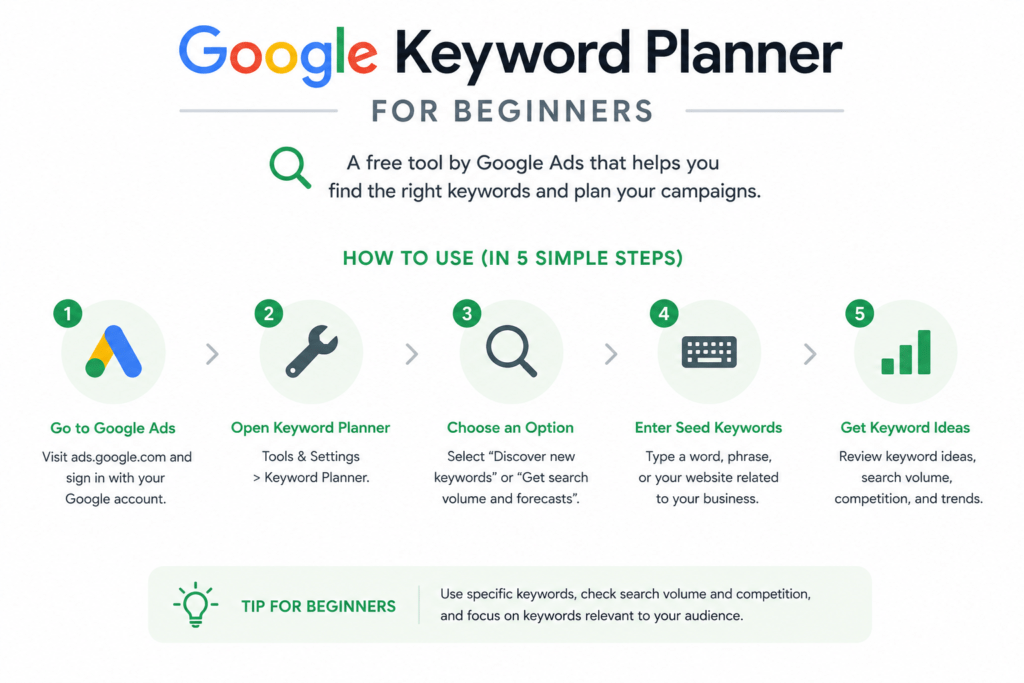
Table of Contents
- Understand what digital marketing actually does
- Know your audience before creating content
- Build a strong digital foundation
- Choose the right marketing channels
- Create content that solves real problems
- Use SEO for long term visibility
- Measure what actually matters
- Common mistakes to avoid
- Frequently Asked Questions
What Is Google Keyword Planner?
Google Keyword Planner is a keyword research tool available through Google Ads.
It helps users discover keyword ideas related to a product, service, website, or business. It also provides estimates for monthly searches and advertising related metrics.
For example, imagine you own a dental clinic.
You could enter:
- Dentist
- Dental clinic
- Root canal treatment
- Dental implants
- Dentist near me
The tool can then provide related ideas that help you understand how people search around those subjects.
Why Beginners Should Use Google Keyword Planner
One advantage of Google Keyword Planner is that it is connected directly to Google search advertising data.
This makes it useful for businesses that want to understand both SEO opportunities and paid search possibilities.
| What You Want to Know | What the Tool Helps With |
|---|---|
| Related topics | Keyword suggestions |
| Search demand | Monthly search estimates |
| Advertising value | Bid estimates |
| Location demand | Geographic targeting |
| Keyword organization | Keyword plans and groups |
However, beginners should remember that search volume is not the only factor that matters.
A keyword with thousands of searches might bring visitors who have no interest in your service. A smaller keyword with clear buying intent could be more valuable.
How to Use Google Keyword Planner
Step 1: Start With a Seed Keyword
Think about the main product, service, or topic you want to research.
A real estate business could start with:
Property for sale
A digital marketing agency could start with:
Digital marketing agency
A dental clinic could start with:
Dental clinic
Step 2: Discover Keyword Ideas
Google provides keyword suggestions related to your starting terms.
You can also enter a website and let Google generate keyword ideas based on that website’s content.
Step 3: Refine Your Results
Do not save every keyword.
Look for phrases that are:
- Relevant to your business
- Closely connected to customer needs
- Specific enough to target
- Appropriate for your location
- Connected to a realistic search intent
Google also provides filters for keyword text, average monthly searches, and other criteria
How to Choose the Right Keywords
Suppose a dental clinic discovers these phrases:
| Keyword | Possible Intent |
|---|---|
| Dentist | Broad research |
| Dental clinic | Service research |
| Dentist near me | Local intent |
| Root canal treatment cost | Commercial research |
| Best dentist in Pune | Strong local intent |
The best keyword is not automatically the one with the highest search volume.
Ask one important question:
Would someone searching this phrase be interested in what my business offers?
That question can prevent a lot of wasted SEO effort.
Using Google Keyword Planner for SEO
Although Google Keyword Planner is strongly associated with Google Ads, businesses can also use its keyword ideas when developing SEO content.
For example, a real estate company can use keyword suggestions to build content around property buying, property investment, locations, home loans, and related questions.
A dental clinic can identify topics around treatments, costs, preparation, aftercare, and local services.
The tool gives you ideas. Your job is to interpret them.
That distinction matters.
Keyword tools cannot fully understand your customers, your brand positioning, or your business priorities. Human judgment is still essential.
Common Mistakes:
Choosing Keywords Only by Search Volume
High search volume does not guarantee useful traffic.
Ignoring Search Intent
A keyword can attract visitors who are looking for information rather than a product or service.
Targeting Extremely Broad Terms
Broad terms are often highly competitive and difficult to turn into qualified leads.
Treating Estimates as Exact Numbers
Google describes these as estimates, and actual campaign performance can vary because of factors such as bids, budgets, location targeting, ad quality, customer behavior, and industry conditions.
Frequently Asked Questions
The tool is available through Google Ads, but Google notes that users need to complete account setup and enter billing information to access basic keyword idea features.
Yes. Its keyword suggestions and search estimates can support SEO research, although the tool is primarily designed for Google Ads.
Yes. Its straightforward keyword discovery process makes it a useful starting point for people learning keyword research.
It provides estimates of monthly searches rather than guaranteeing an exact future number.
Yes. Businesses can research keywords by location, which is particularly useful for clinics, real estate companies, local services, and regional businesses.
Conclusion
Google Keyword Planner is a practical starting point for understanding how people search for products, services, and topics.
The biggest mistake would be treating the tool as a machine that automatically tells you which keywords to rank for. It does not.
Use its data as a starting point. Consider search demand, relevance, intent, competition, and business value. Then combine the findings with actual Google search results and your knowledge of your customers.
That is how Google Keyword Planner becomes more than a keyword suggestion tool. It becomes part of a thoughtful SEO and content planning process.